
ServeFast · Digital operations for customer service
Every request has an owner and a clear deadline.
It gathers customer requests in one place, follows them through to closure, and shows management the service indicators.

ServeFast for customer service departments.
Customer service or contact center manager
Sees every request in one place, and knows what is running late before the customer complains.
Customer service agent
Sees their requests and deadlines in one place, instead of hunting for them between the phone and email.
General manager or operations manager
Sees the customer service numbers without having to ask for them.



In organizations such as: professional services offices · maintenance and after-sales service centers · facility management companies · clinic complexes · property management · private schools — and any department that serves the rest of the organization from within. In clinics, it manages communication, not the medical record or clinical scheduling.
Three problems that keep recurring in customer service departments.
- 1
Requests arrive from everywhere
The phone, WhatsApp, email and the branch, and each agent sees only part of them.
We bring them into one path, so no request is lost, and the customer doesn't get repeated replies from different agents.
- 2
Promises without follow-up
An agent promises a customer a time, and no one else knows about it.
Every deadline carries a countdown everyone can see, with an alert before it slips.
- 3
Numbers that exist but say nothing
Management asks about customer satisfaction and meeting deadlines, and the manual gathering of numbers begins.
The service indicators appear in front of you and update continuously, instead of relying on estimates.
One request, from the first message to measuring customer satisfaction.
Service request · Ticket 1284
Illustration- Channel
- Status
- In progress
- Owner
- [Staff name] · Service team
- Deadline
- Within 3 hours
- Message received
- Routed to the service team
- Work started
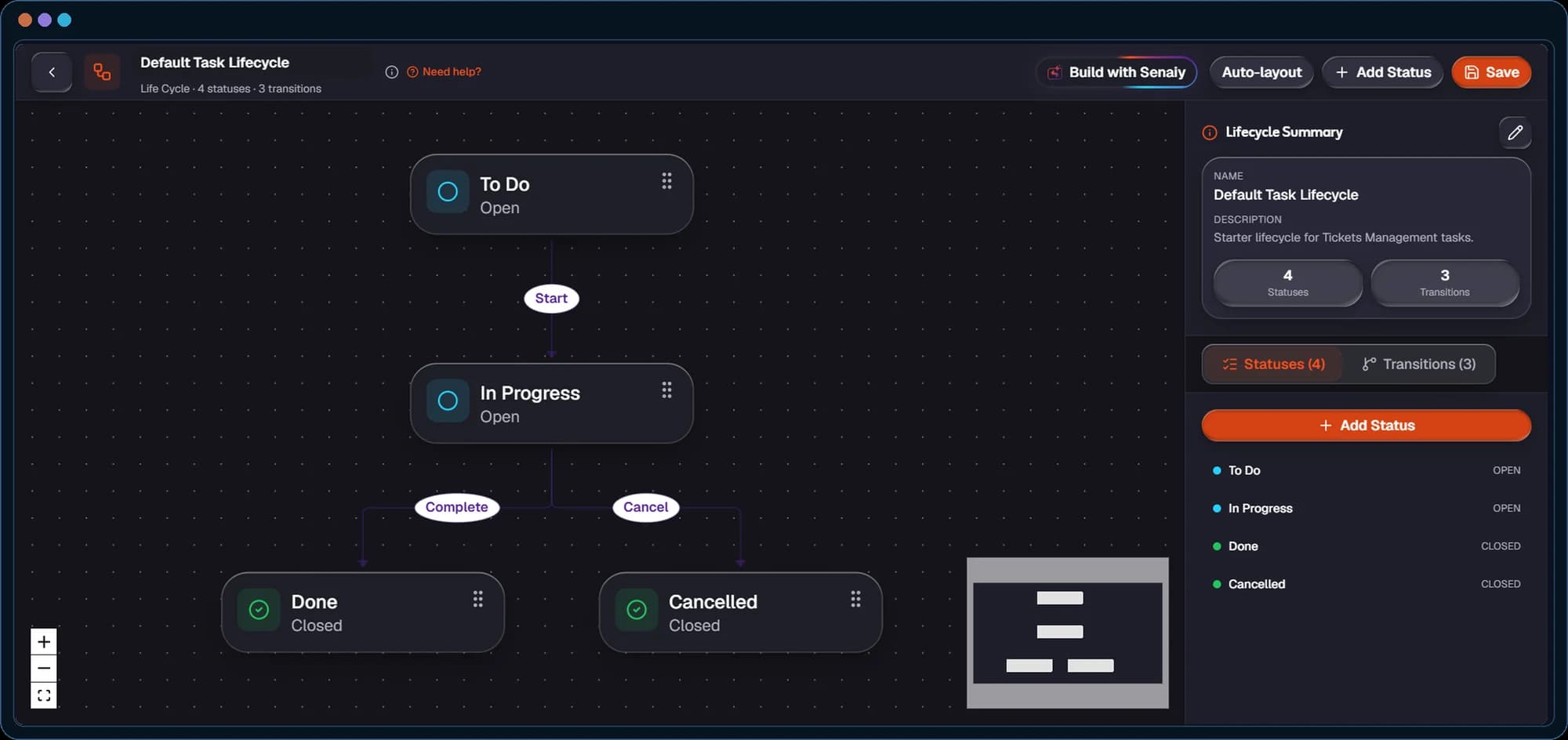
The path is drawn once on SAYR, and every request follows it automatically.
What's in the core package: four programs.

Omni-Channels Management
WhatsApp, email, social media and calls on one screen, and any conversation becomes a ticket with its context kept.
The customer never has to explain their problem again.
Customer Relationship Management
One record for each customer, with every call and task linked to its owner.
You know where the customer stands and their next step before you reply.
Tickets Management
Every request is a ticket with a priority and a clear deadline, moving through its stages from the first reply to closure.
Easier follow-up on requests, and less chance of forgetting them or replying late.
Services Management
The customer chooses the service from the catalog or with the team's help, and the software follows its delivery through to completion.
Every service is delivered the same way, every time.
And we connect the package to your existing programs: we complete what you have, and don't ask you to tear it down.
And additional programs, which you turn on when needed.
Examples of additional programs that run on the same package foundation.




Quotation management
When a customer's inquiry becomes a price request: the team prepares the quotation and sends it, then turns it into an invoice once approved.

Contract management
Tracks agreements and their renewal dates, alerting you as a renewal approaches.

Asset management
A register of the company's assets, with their maintenance scheduled on time.
Any other need outside the package, we record, review with you, and come back to you with what can be done and when.
And if you wish, AI agents work with you.
Agents from Senaiy, the AI agent ecosystem, which you add to the package when you want. Among the agents you can add:


“The Router”
Sorting and routing requestsReads every request the moment it arrives, understands its type and urgency, and sends it to the right person or team, so no request is left waiting to be routed.

“The Guardian”
Following deadlinesWatches the deadline on every request and alerts before any delay, sending the request's full context and the suggested next step with the alert.
And for those who need a wider management view: Saqr.
A package separate from ServeFast, which you add when you want to track customer service indicators and steer the work by them.
- KPI Management
Indicator management program
Customer satisfaction and meeting deadlines are calculated from the work itself, with no manual entry.
- Monitoring
Alerts and follow-up program
Alerts you to any unusual change in the indicators, before the problem grows.
- Business Intelligence
Data analysis program
Dashboards that show each level the indicators that concern it, from the staff member up to the board.
Saqr also has programs for strategy and governance, for those who need them later.
Who works with you
At every step, the platform never works alone: our team sets up the package around the way your organization works, moves your data and connects it to your existing programs, then stays with it through operation — with AI helping. Our teams complement your team; they don't replace it.

Find your starting point.
Choose one of your customers' requests, and we'll map its path with you in a free 30-minute diagnostic session.
- The request's path as it runs today
- What the core package covers
- The right add-ons, if needed
Media center
يعني إيه «عمليات»؟
SAYR
Saqr
Frequently asked questions
Is ServeFast a help desk ticketing and customer service system?
Yes. ServeFast gathers customer requests in one place, and every request is a ticket with a priority and a clear deadline, moving through its stages from the first reply to closure. The core package includes four programs: unified channel management, ticket management, customer relationship management and service management.
Does it bring WhatsApp, email and calls into one place?
Yes. WhatsApp, email, social media and calls on one screen, and any conversation becomes a ticket with its context kept. So no request is lost, and the customer never has to explain their problem again.
How does ServeFast make sure service deadlines (SLA) are met?
Every request has an owner and a clear deadline, and every deadline carries a countdown everyone can see, with an alert before it slips. If you wish, you can add “The Guardian” agent, which watches the deadline on every request and sends the request's full context and the suggested next step with the alert.
Does it show management the customer service indicators?
Yes. The service indicators appear in front of you and update continuously, so the general manager sees the customer service numbers without having to ask. For a wider view, Saqr is a separate package that adds dashboards for every level, from the staff member up to the board, and alerts on any unusual change in the indicators.
Does ServeFast measure customer satisfaction?
Yes. When the request is closed, the customer receives a satisfaction survey automatically. With Saqr, customer satisfaction and meeting deadlines are calculated from the work itself, with no manual entry.
Who is ServeFast for, and does it connect to our current software?
Customer service departments and contact centers, in organizations such as professional services offices, maintenance and after-sales service centers, facility and property management, clinic complexes and private schools. In clinics, it manages communication, not the medical record or clinical scheduling. And we connect the package to your existing programs: we complete what you have, and don't ask you to tear it down.